This morning I woke up to a noticeably slow blog. Pages that normally loaded instantly were dragging, and something clearly wasn’t right.
What I discovered was a high-volume POST request flood that nearly brought my AWS Lightsail server to its knees.
I was able to stop this attack with a simple Apache rule and I wanted to share how in this article!
Quick Answer
How can I stop a WordPress POST flood attack?
You can add code to your theme’s functions.php file that will reject POST requests on your posts.
You can also block malicious POST requests by adding specificRewriteCondandRewriteRuledirectives to your.htaccessfile. These rules can return403 Forbiddenor204 No Contentresponses to stop the flood from hitting your PHP processor.Will adding .htaccess rules break my WordPress site?
Saving posts stops working for admins while the rule is in effect. To prevent them permanently you should modify your functions.php file.
The .htaccess rule will work in a pinch / temporarily to stop the attack. Always backup your.htaccessbefore editing, and test with your own user-agent to ensure legitimate traffic isn’t blocked.How do I know if my site is under a POST flood attack?
Check your server load metrics and Apache/Nginx access logs. A sudden spike in 5xx errors, high CPU usage from
php-fpm, and repeated POST requests toindex.phporwp-login.phpfrom known bad IPs are strong indicators.
Why Was My WordPress Site Suddenly So Slow?
The first symptom was obvious: everything felt delayed. This was the first indication something wasn’t right.
After logging into the server, I immediately checked performance metrics and saw something alarming. Redis object cache response times were exceeding 1000ms:

For context, that’s extremely slow for a caching layer that should operate in milliseconds. Over 1 full second response time from Redis for a WordPress blog? Absolutely unbelievable.
Even after restarting core services like Apache and PHP-FPM, nothing improved. That told me the issue wasn’t a simple stuck process.
What Was Causing High Server Load on AWS Lightsail?
Next, I checked my AWS Lightsail instance dashboard and noticed something important: I had completely burned through my burst capacity overnight:
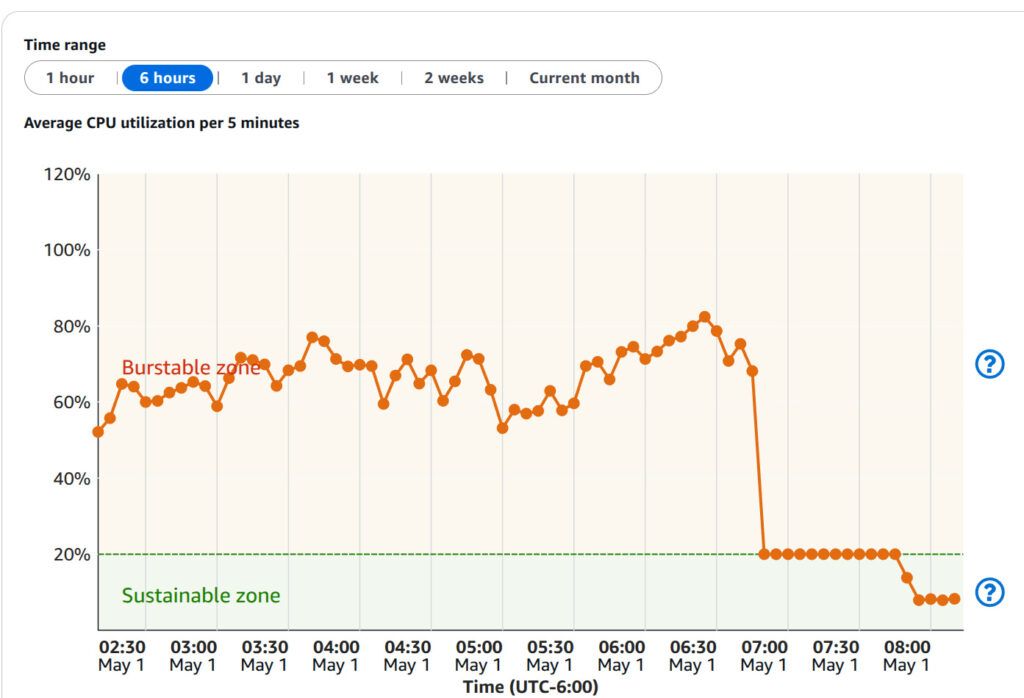
That explained the performance degradation but not the cause. I ran the top command on my server to try and see what was going on:
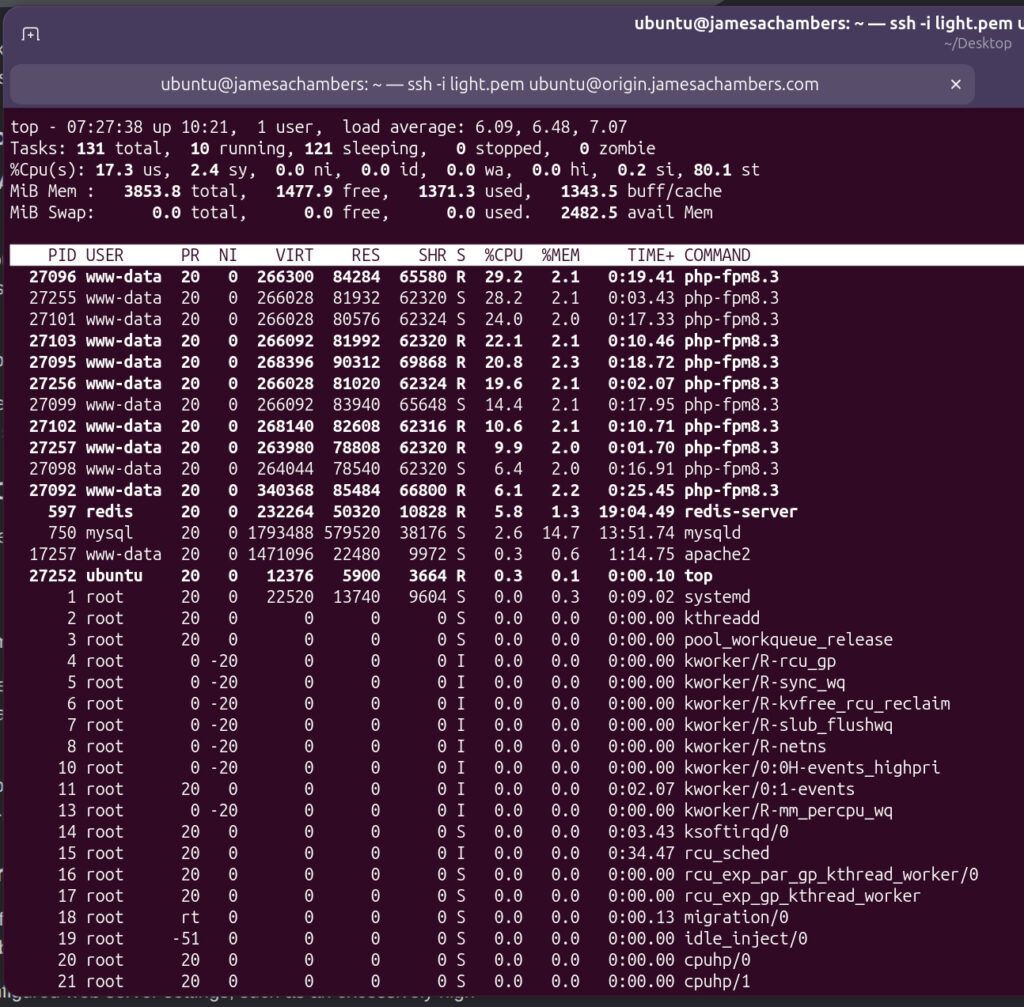
Wow. Either my blog absolutely exploded in popularity or something is very wrong.
The question remained: what was driving sustained CPU and request load all night long?
How Did I Detect the POST Request Flood Attack?
To find the source, I tailed the Apache access logs:
tail -f /var/log/apache2/access.logWhat I saw was immediately suspicious:
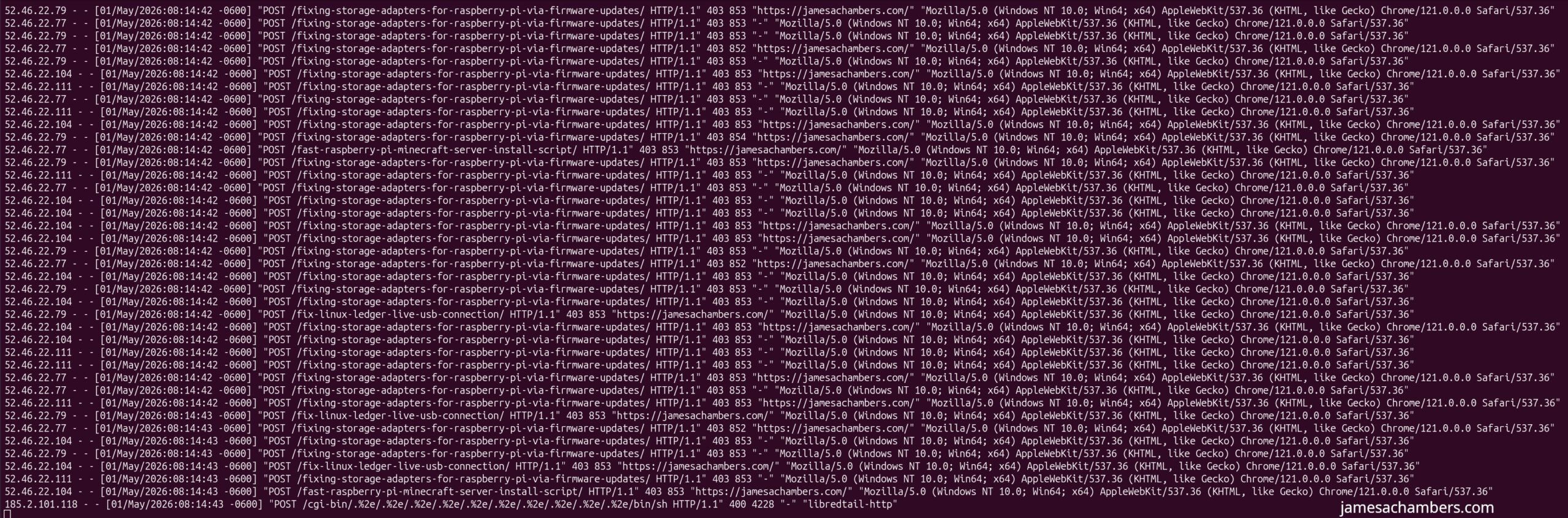
A constant stream of POST requests (dozens per second show in the screenshot above) targeting WordPress endpoints and even random post URLs. This wasn’t normal traffic or bots indexing content. It was a deliberate request flood.
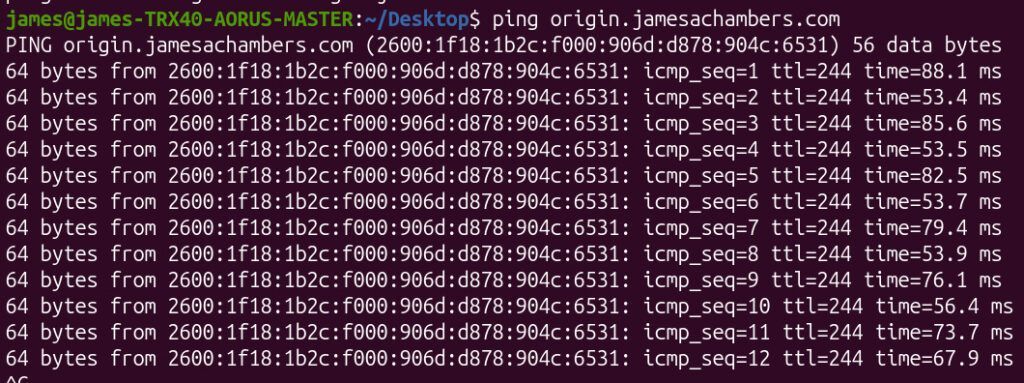
Even worse, it was affecting network stability. I was seeing ping jitter, which indicated the server itself was under significant strain:
Why Not Just Block the IP Addresses?
At first glance, blocking IPs seems like the obvious solution.
But there was a problem.
The requests were coming through AWS infrastructure on the frontend. I’m using a content delivery network (CDN) distribution so the IPs in the log are actually Amazon.
Because the origin server was behind a CDN blocking those IPs would effectively block legitimate traffic as well.
So IP blocking was off the table.
Why Didn’t I Use a Web Application Firewall (WAF)?
The proper long-term solution would normally be a WAF, such as:
- AWS WAF via CloudFront
- Cloudflare protection in front of origin servers
However, in this case I was using AWS Lightsail distributions, which don’t integrate cleanly with AWS WAF without migrating to a full CloudFront architecture.
That would work but it adds complexity I didn’t want to introduce during an active incident.
So I opted for a simpler immediate mitigation.
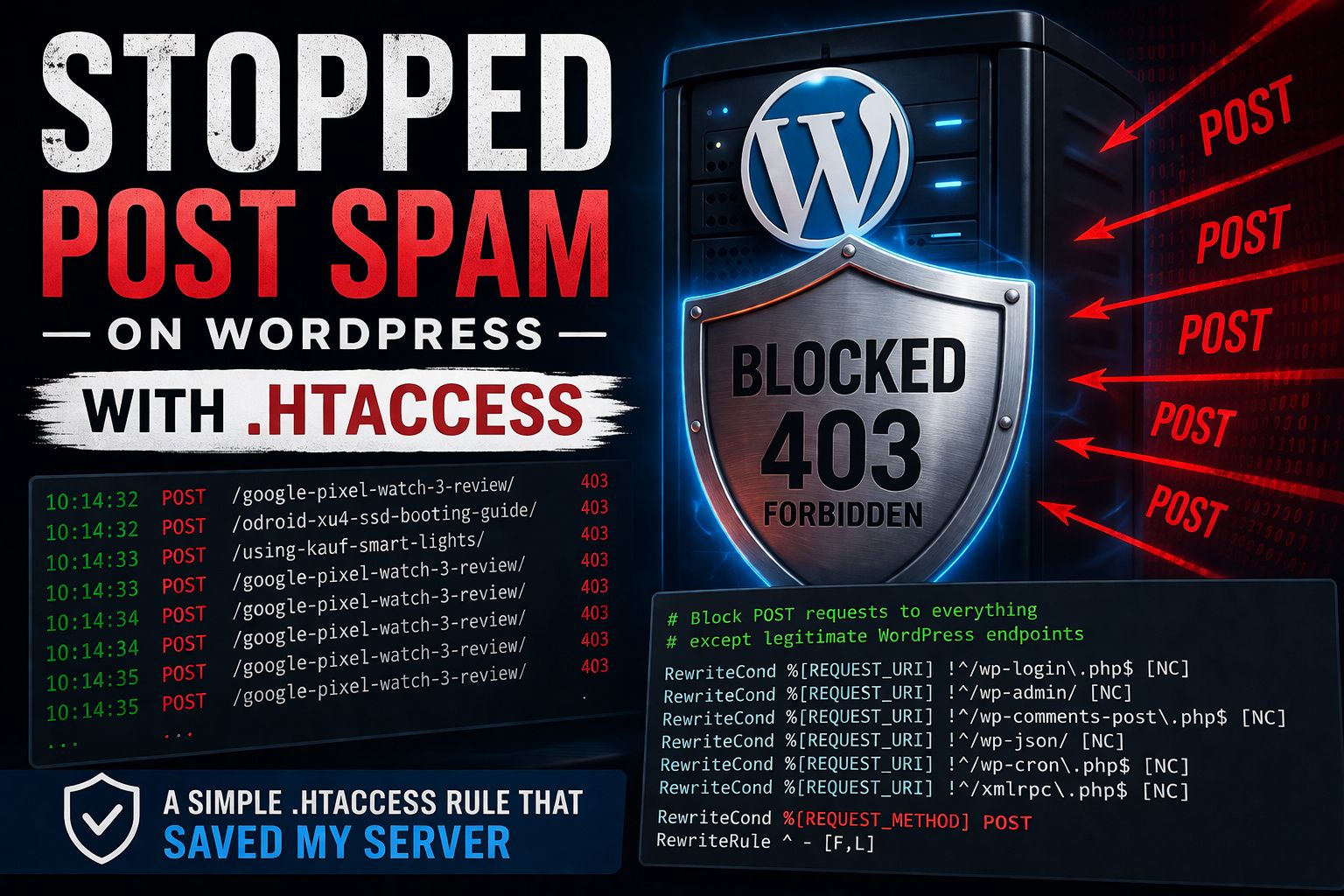
How Did I Stop the WordPress POST Flood With .htaccess?
The attack pattern was simple: abusive POST requests hitting non-essential endpoints.
That meant I could block them at the Apache level using .htaccess.
I added the following rules above the WordPress block:
# Allow legitimate WordPress POST targets
RewriteCond %{REQUEST_URI} !^/wp-login\.php$ [NC]
RewriteCond %{REQUEST_URI} !^/wp-admin/ [NC]
RewriteCond %{REQUEST_URI} !^/wp-comments-post\.php$ [NC]
RewriteCond %{REQUEST_URI} !^/wp-json/ [NC]
RewriteCond %{REQUEST_URI} !^/wp-cron\.php$ [NC]
RewriteCond %{REQUEST_URI} !^/xmlrpc\.php$ [NC]
RewriteCond %{REQUEST_METHOD} POST
RewriteRule ^ - [F,L]
What does this rule do?
It blocks all POST requests unless they are explicitly needed for WordPress functionality such as:
- Login (
wp-login.php) - Admin dashboard (
wp-admin/) - Comments (
wp-comments-post.php) REST API (Update 5/4/2026: This endpoint does not respect the htaccess rule and will stop you from being able to save new posts. Use functions.php approach instead (outlined in the next section)wp-json/)- Cron jobs (
wp-cron.php) - XML-RPC (
xmlrpc.php)
Everything else gets an immediate 403 Forbidden response.
Update 5/4/2026: Using functions.php Instead
I found that the wp-json rule was being ignored with WordPress using this approach. Instead I added this to my theme’s functions.php file:
add_action('parse_request', function ($wp) {

    if (is_admin()) return;

    if ($_SERVER['REQUEST_METHOD'] !== 'POST') return;

    // If WordPress resolved a main query object
    if (!empty($wp->query_vars['p']) ||
        !empty($wp->query_vars['page_id']) ||
        !empty($wp->query_vars['name'])) {

        status_header(405);
        nocache_headers();
        exit('POST not allowed on article URLs');
    }
});
This prevents WordPress from rewriting certain URLs before it ever hits our .htaccess rule instead. I strongly recommend using functions.php instead.
Did This Actually Fix the Performance Issue?
Yes. Instantly. Once the rule was deployed:
- Server load dropped immediately
- Redis cache latency returned to normal
- Ping stability recovered
- Apache access logs normalized
- Burst capacity stopped draining
The difference was immediate and measurable. Here’s a look at Redis after the attack:
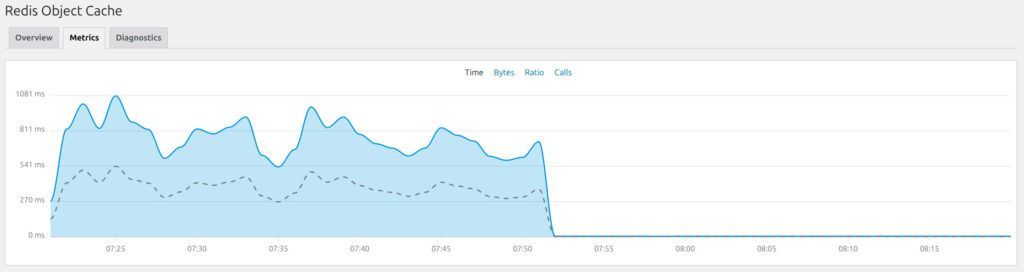
You can see that once I put in the POST blocking rule my latency dropped down to essentially zero again.
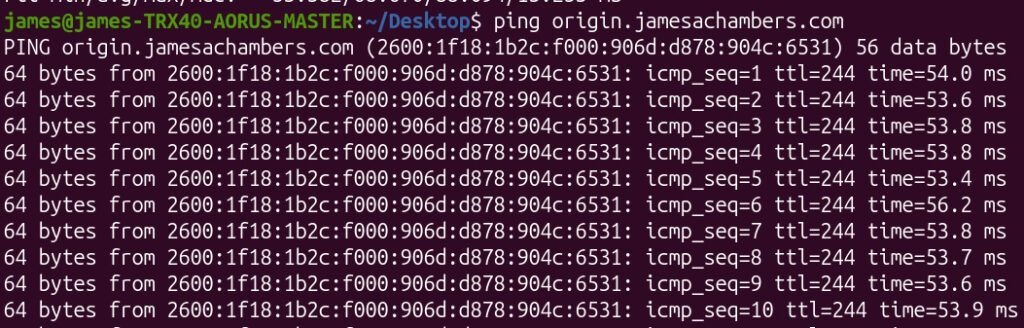
My ping times also recovered back to normal without any jitter:
Why Is This Approach Effective Against POST Flood Attacks?
This type of attack relies on volume, not sophistication.
By rejecting unwanted POST traffic at the web server level:
- You eliminate backend processing cost
- You protect PHP and database layers
- You preserve caching performance
- You reduce CPU exhaustion from request handling
Even though attackers continued sending requests, they were now being rejected cheaply with 403 responses.
Should You Let Attack Traffic Continue After Blocking It?
In this case, I chose not to actively escalate further blocking once the performance issue was resolved.
The reasoning:
- The server can cheaply return 403 responses
- It avoids complex over-engineering during mitigation
- It may indirectly expose the attackers
However, in higher-risk environments, a full WAF or CDN-based filtering layer would be the proper long-term solution.
This is my personal blog so I have the luxury of trying to expose the hackers without getting in any kind of trouble.
In this case they noticed I had stopped their attack though before I even published the article. I was hoping they wouldn’t notice and their ISP (or whoever owns the presumably compromised machine used for this attack) would feel the impact and start investigating.
When Should You Upgrade to a WAF Instead of Using .htaccess Rules?
This quick fix is effective, but not universal.
You should consider a WAF if:
- Attacks become distributed and adaptive
- You need geographic/IP reputation filtering
- You require rate limiting per client
- You operate at high traffic scale
- You want centralized security rules across multiple services
For AWS users, this typically means migrating to CloudFront + AWS WAF or using a reverse proxy like Cloudflare.
What Did This Incident Ultimately Teach Me?
This attack wasn’t sophisticated but it was effective enough to degrade performance significantly.
The key takeaway is that:
Simple request filtering at the edge of your application can be enough to neutralize real-world attacks (at least long enough to stabilize your system and plan a deeper defense strategy).
Final Thoughts
By morning’s end, the logs went quiet and the system stabilized. The attack had effectively been neutralized with a few lines in .htaccess, without needing a full infrastructure redesign.
Sometimes the simplest fix is enough to keep a system standing (at least until the next challenge arrives).
The Legendary Technology Blog has been here for a long time and still will be for a lot longer.
If I continue to get attacked I will probably start using CloudFlare but for now this was all it took to end the clown show!